About

Randy Krum

Product Development, Marketing, Visual Thinking and Data Visualization professional fascinated by good infographics.  Always looking for better ways to get the point across.


RandyKrum.com

Search Cool Infographics
Caffeine Poster

Follow Me!


Follow Randy (Twitter @rtkrum) 

Blog posts ONLY on Twitter

Twitter List: Cool Infographics People

Cool Ads
Supreme Court Poster

WallStats Poster

Subscribe

Subscribe on your Amazon Kindle:

RSS Feed:

Subscribe in a reader

Subscribe via email:

Enter your email address:

Delivered by FeedBurner


Add to Technorati Favorites


View blog authority

Infographics Carousel
Marketing Profs

MarketingProfs reviewed more than 200 sources and selected 64 of the best to create the Digital Marketing Factbook—a compilation of data covering the critical topics of digital marketing.

Thanks to...
Powered by Squarespace


« FREE Infographic Holiday Cards! | Main | Send your own Augmented Reality Christmas Cards! »
Saturday
12Dec2009

My Digital Life - personal infographic
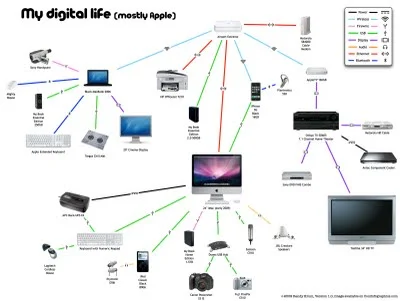


My Digital Life, is an quick infographic by me!  A mindmap or network map of the digital products in my life, and how they all interconnect. Each connection is color-coded by the connection type (USB, wireless, ethernet, etc.) including its respective standard icon.  High-res version is on Flickr.

This started as a simple sketch to help me determine how to add a new external hard drive I got on Black Friday, but it quickly became much more fun to see how far out I could push the network.  I already know of some more that I want to add, so someday there may be a 2.0 version.  Apparently, I could use an IT manager at home.
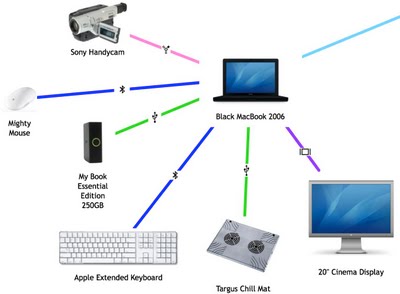


I did ignore some differences within the connection types to keep this fairly simple.  I don't distinguish between USB 1.1 and USB 2.0 connections.  I use "Display" as a connection type, but its a DVI connection for the MacBook, a HDMI connection from the AppleTV and a composite connection from the DVD player.  I also show only one "Wireless" connection, but I know that the iPhone only uses 802.11g and the laptop uses 802.11n.

I did this using OmniGraffle, with a little help from Pixelmator and Keynote to clean up the images.

PrintView Printer Friendly Version

EmailEmail Article to Friend

Reader Comments (3)

This is pretty cool. I've taken a few stabs at this myself. I think I'll retry mine.

December 13, 2009 | Unregistered CommenterVitaminCM

Thanks VitaminCM. Let me see your gadget network when you're done!

December 14, 2009 | Unregistered CommenterRandy Krum

From @Timeplots on Twitter: "Edward Tufte posted a link to Timeplots in AskET- Tufte calls the SCOTUS map "intriguing and complex"- http://bit.ly/4FDvIn (scroll down)"

Very cool!

December 16, 2009 | Unregistered CommenterRandy Krum

PostPost a New Comment

Enter your information below to add a new comment.

My response is on my own website »
Author Email (optional):
Author URL (optional):
Post:
 
Some HTML allowed: <a href="" title=""> <abbr title=""> <acronym title=""> <b> <blockquote cite=""> <code> <em> <i> <strike> <strong>