About

Randy Krum

Product Development, Marketing, Visual Thinking and Data Visualization professional fascinated by good infographics.  Always looking for better ways to get the point across.


RandyKrum.com

Infographic Design


Subscriptions:


How to add the
Cool Infographics button to your:

- iPhone
- iPad
- iPod Touch


Subscribe on your Amazon Kindle:

Follow Me!


Follow Randy (@rtkrum) 

Blog posts ONLY on Twitter

Twitter List: Cool Infographics People

Search Cool Infographics
From the Bookstore

American Presidency Poster

Caffeine Poster

Gadget Map

Cool Ads

Your Pictures Into Posters, Overnight


WallStats Poster

Infographics Carousel
Thanks to...
Powered by Squarespace


Entries in visual (224)

Monday
Jul262010

How Does Diet Soda Cause Weight Gain? [infographic video]

Another great use of infographics, illustrations and visual examples used in a video to better communicate a message.  How Does Diet Soda Cause Weight Gain? is a video from Wellness-Works.net.  I wish they would credit the artist so we knew who made the video for them.

An informative, fun video about the importance of your food’s pH and its impact on your health.

Wednesday
Jul142010

Cool Infographics People on Web Trend Map!

As a visual treat, I took my Twitter list “Cool-Infographics-People” and visualized the entire list on the interactive tool Web Trend Map from iA and Craig Mod.  Visit often, and you can see the hot trends being tweeted that day by some of the best infographics people.

I don’t know how Twitter lists are doing in general, but I know that with 436 followers, the “Cool-Infographics-People” list is one of the most followed lists in the design community.  Out of the 228 lists I’ve been included on, this one is the most followed, and I see that for many other designers too.  I’d love to see (and visualize) the stats from Twitter, but most lists I see have under 10 followers.

Monday
Jul122010

VisMag Volume 3: Isometric and an Interview with Chris Watson #vismag3


Chris Watson, from Visual Think Map,  has released Visualisation Magazine Volume 3: Isometrics.  You can view it completely online, OR you can purchase a print copy from Amazon.com for $22.00.  This volume covers some of the great designers of isometric-style infographics that have been published in both print and online.

You can win a FREE copy of the printed book by tweeting a link to this post on Twitter using the hashtag “#vismag3” by the end of the day on July 16th.  A winner will be randomly chosen to receive a printed copy of the book.

Chris was very gracious, and has also agreed to answer a number of interview questions about his work and publishing Visualisation Magazine:


Cool Infographics: How often do you publish the volumes of Visualisation Magazine, and how many in the future do you already have the topic planned?

Chris Watson: I’d like the volumes to be more regular in their publication, and hopefully more consistent, but I got delayed with this one as I had other things taking my time. Greg Smith at serialconsign.com said to me in an email ”Nothing is ever definite (datewise) when it comes to publishing, web or otherwise”.

Yes, I have some future volumes planned.  The next issue was going to be a collaboration with Wes Grubbs at Pitch Interactive, but recently he has had to concentrate on work recently. We still have a potential list of contributors and work lined up to contact, including Greg for: Volume 5 | Large Data Visualisation: Form and Process

So, due to the delay, and wanting to keep it moving along, Logan Holmes, a colleague of mine, at the same college where I teach and just as passionate an admirer of infographics, suggested we do a volume on the less clinical, beautiful, finished, polished examples of data vis/infographics. Therefore, we thought let’s show the handmade, in-progress examples with less formal styles. They might be just humorous, making good observations of life, or challenging our visual thinking. http://visualisationmagazine.com/volume4_handmade.htm

The list is still being compiled and as yet no one is confirmed, but hopefully we can get permission for most of what we have seen. 


Cool Infographics: How long does it take to put together an issue of Visualisation Magazine like The Isometric Volume?

Chris Watson: It probably takes 2 weeks to put together when you have all the content. Allowing time to not see it for about a week and then come back to it so you can see your typo’s and be more judgemental as to its overall look, order etc.

But as I do it as a ‘hobby’, meaning to say it doesn’t pay me like my teaching job does.  I have to balance how many evenings I spend compiling, sourcing high-resolution files, rendering to the right file format for printers, etc. with how much time I spend with my partner.  Overall, it ends up taking about 2 months, 10-12 weeks.


Cool Infographics: What are your thoughts behind selling the printed version, but making a complete online version available for free?

Chris Watson: It’s intriguing you ask that.  My initial motivation to make the magazine was that I wanted a publication that was just on infographics and data vis because it is such a growing field with so many being produced. There are written journals such as IEEE with their vis week and there are conferences such as VizThink, but where is the style side?

You have one for typography – Eye, graphic design/advertising – Creative Review, illustration – Computer Arts and then their sister publication – Computer Arts Projects that varied their specialised content.

I would have loved to have printed it from the start, but just assumed you’d have to buy a bulk amount of copies. I thought I’d see if it got a following and then one day ask if they would buy, or invest in printing. Then, after circles with Pedro’s help we got lots of positive praise with thanks to you Randy for helping raise awareness on blogs.  Many of them asked ‘is there any chance of getting it printed?’.

One of them pointed out that there was a Print-on-demand service called Magcloud in the US through LinkedIn. Shame they didn’t ship over the pond (back then, I haven’t checked since). Anyhow researched about print-on-demand, and developed a visual comparison here http://visualisationmagazine.com/blogvisualthinkmap/2009/10/self-publishing-visualisation.html

So I could make it available to print through Create Space and cost me a proof copy, not a bulk batch that I had to try and sell and hope there was a demand for it.

I left it free to view online because it was my original intention.  It’s just great to see the work in print. I think Nathan at flowingdata.com about the same time started a print facility of just the posters, as apposed to a bound book.

I’d like a publisher to get behind it, market it, and print it bigger, as probably does anyone ;o).


Cool Infographics: What tools do you use to design and layout a volume.

Chris Watson: I use Adobe InDesign, Pedro was familiar with InDesign and I had trained with InDesign at college and being Adobe, the interface is familiar to Illustrator and Photoshop. I did the 1st volume/version on Adobe InDesign 2.0 and it has improved a lot to the CS4 version that it is rendered through now.

Photoshop renders the pictures and Create Space desires you to render your cover (front and back glossy outer cover) through it.  Their template for trim sizes is in .psd format.

The style of the layout and design was influenced by NeueGrafik and the swiss/basel school of design with J M Brockmann etc. that both Pedro and I loved. Clean white space and Helvetica font to not interfere with the infographics/data vis work.


Cool Infographics: How receptive were the different designers to being included and giving you the information you needed?

Chris Watson: Oh, they are the reason it works.  If they didn’t get back to me, I’d have no content. I don’t just want to feature them without permission and many instances I’d like higher resolution files for good quality prints. So huge thanks to everyone who contributes and responds back to my emails.

They are all generally very happy to feature their work. I don’t share their high res files with anyone other than the printers in a PDF, and you get some that go to above and beyond what I’d asked for to give me more content.

For instance, Arnaud from as-map.com on the last issue said, you should look and feature Paul Kahn’s work. Paul shared the passion for the magazine and sent me examples of his work (…& Associates), and a few images from a journal article that had been published. Then he mentioned I should look at Kris Lenk and speak to him about his work, as they both had created dynamic diagrams.

I contacted Kris and he sent me an article, images, work from his students at Rhode Island school of design. Same with Gareth at Trainiac.  He sent me loads, chased down copyrights, answered an interview sharing great insights and got Rob, a designer/colleague to answer them as well.

So they are all very generous with their time, and work, which I’m very thankful for and I guess it gives them and their business/work further exposure, kudos.

Many of them only ask that I clearly point out the owners/authors, offset one or two images not to show the entire image of their work because they also sell it commercially.  Some ask if I can send them a printed copy, which I’m trying to do with the slight amount of profit it makes. Needs to sell more to be able to order copies to be sent to people, as I don’t have any capital, just an abundance of time, enthusiasm and effort.


Cool Infographics: Was it difficult to coordinate the different Copyright and Creative Commons issues?

Chris Watson: Yes, to an extent.  I recently got a template for a printed written agreement form to send to people to try and safeguard against legal action and I hope it never arises.  I wouldn’t share or feature it without an email saying ‘yes ok’. The Circles and this Isometrics volumes were just people saying ‘yes, sure’.

To enable the online smooth nature of communication between me and the contributors, I found a fax to email site that people send to.  I get it as a PDF file so they could sign. The agreement slows the process down, and people worry about what they are signing. So still not sure if I will use it, I have an email with them saying ‘yes use it’.

Not sure I have seen any instances of how the creative commons has stood up in court. Not with sites like Flickr.com and Behance.net integrating it to license their work with a ‘I trust it if they do’ sort of attitude. They are good because I want to share it, non-commercial, attributed to the author.


Cool Infographics: Where do you have them printed, what are the printing specs and why?

Chris Watson: After comparing in the link from question 5, I use Create Space, setup by Amazon. Let everyone anywhere order a copy.

They have, like many of the others, preset sizes, and I assume they have costed it that way.  But I wanted the square format; I liked the other magazines previously mentioned such as Computer Arts Project and Creative Review. It’s sort of balanced and proportioned, much in the vein of NeueGrafik and a slightly cheaper end price for the buyer compared to A4 (less paper, less ink used I guess).

This square was 8.25 x 8.25 in their presets so had to tweak slightly to what I had original made for online.  I think I did 10 x 10 (inch). It took a bit of farcing trying to interpret their specs for dimensions with margins and bleed areas. Maybe it’s just me, but I eventually realised where they wanted the margins and bleed space and thankfully it didn’t make it smaller by too much. I have a template now, so didn’t take as long for the Isometric Volume. I sacrificed a little of the white page space from around the designs, the edge of the page to the edge of a box, bold line/title. But overall, I was extremely pleased with the binding, cutting and colours printed (I struggled mind you with dense black areas such as Web Trend Map or the Oscars visual by Wes,  It was hard to see the colour details).


Cool Infographics: How has the Issuu service to publish online worked for you?

Chris Watson: I liked it.  I need to figure out how to get the Flash used by Issuu.com to display on an iPad and smart phones. I think you can wrap it in HTML5 in some way.  I’ve seen a nice infographic I tumbled and need to investigate further.

You can get an app for Google Android to view publications as opposed to directly on my site, and I think they are making one for iPhone.

It’s good because I could customise it to remove certain functions from the interface such as downloading the PDF, embedding the whole document at their own site rather them view it at my site and hopefully subscribe to the mailing list to see future/previous issues.

It has this nice zoom capability, which at the beginning was good.  I’d like you to be able to zoom into visualisations that were really large and detailed such as the Web Trend Map and density designs work. It also let people share it through the Sharethis service or email to try to get the web 2.0 going and raise awareness of the publication.


Cool Infographics: What’s your favorite Isometric visualization?

Chris Watson: *smile* I’m not sure, its partly the reason I put them in a mag. There are various aspects of all the different ones featured.

For instance I love the abstract creative nature of Eboy.  It’s a very graphic design (I trained and teach graphic design). They might not communicate specific info with a clear message or comparison like an infographic, but I love the visualisation of the websites into abstract non-physical (i.e. the world wide web/digital) space. Like the Web Trend Map, it takes the Internet from a conceptual space to an impression of absolute almost physical space.

The width dimension with the stacks for stability in the Web Trend Map is so good.

Love the idea of files been given a space in the same way like with Paul Kahn’s work, that you can navigate and see them as a whole in your computer (…for them a website).

Love the physical space being depicted in a flow of processes with Funnel, Inc., and the complexity that Trainiac depicts and abstracts different departments in a business. The bold colors in a line graph with GOOD, inc. and Timko & Klick; very unique.

Arnuad’s CV style is brilliant too.  With the color-coding of how the skills have built up to be him as they stack in the middle.

Bit of an evasion to the question, but I do love these different successes.


Cool Infographics: What can we expect from Chris Watson and VisualThinkMap in the future?

Chris Watson: Hmm…  Busy, I might be sad but I keep trying to challenge how I visualise data, or visualise things that I think would greatly benefit. It’s strange but for a designer they are always striving to create new forms/reinvent old forms, create the new. It’s what drives me, so I try to make new forms, not just stylistically but that have function too.

I did a wayfinding project for a library at a college. Ultimately, they didn’t use it as I designed.  I didn’t really get asked to; I just wanted to make it better and spent longer than expected to make the design work for the place. It didn’t sit well with me as planned to let them use it for free.  I offered it to them really cheap but they didn’t want to pay.  It’s a shame, but you can’t blame them. Will post the look of that soon with some of the thinking behind the project.

I have recently completed this project that I need to get round to posting and telling the Wordpress community.  I want to see if they will use it, or consider it.

http://www.behance.net/gallery/My-Wordpress-Web-2_0/513412


I revamped the My Web 2.0 graphic as I have come across new services that I use since its inception.

http://www.behance.net/gallery/My-Web-2_0/379498


Working on the next issue with Logan Holmes of Visualisation Mag – Handmade/Informal – Volume 4 

I am collaborating with Logan on visualising poetry/creative writing with illustration/drawing and plan to make it into a bound book differently than that through Create Space. 

Logan, myself and another colleague (photographer) are planning projects that do blow our mind and hopefully are realised in the future.


Friday
Jul022010

5 Ways to Cultivate an Active Social Network infographic


5 Ways to Cultivate an Active Social Network is a nice infographic by Mark Smiciklas at Intersection Consulting.  Although not conveying a lot of data, this does a nice job of visualizing the five different activities that Chris Brogan advocates to build and maintain your social network.

This marketing visual was inspired by Chris Brogan. Check out his original post: Cultivate an Active Network.

Thanks to @MarshaCollier on Twitter for tweeting the link.

Wednesday
Jun162010

Facebook's Secret Strategy Infographic

Art: Audrey Fukuman

There was some controversy when Facebook CEO Mark Zuckerberg unintentionally revealed the 2010 Facebook Strategy Infographic that was printed on the inside liner of his hoodie at the D8 conference.  Audrey Fukuman at SFWeekly.com has recreated the infographic based on the video and photos.

Photo via AllThingsD/Anna Mathat

According to SFWeekly.com, this was a hoodie given to all Facebook employees.

I expect some disagreement, but I’m a firm believer that you can absolutely design an infographic to represent a strategy, a concept or a qualitative result.  Infographics don’t have to be based only on a massive amount of quantitative, numeric data.  What do you think, does this qualify as an infographic?

Here’s the video clip from the AllThingsD D8 conference when Mark removed the hoodie and revealed the graphic:

Found on SFWeekly.com and digg.com

Thursday
Jun102010

A Cool Interview with Nathaniel Pearlman (infographic designer)


With the release of the Visual History of the American Presidency last week, I asked Nathaniel Pearlman, infographic designer and President of Timeplots, LLC, if he would be willing to do a short interview.  Nathaniel was nice enough to answer a few questions about his infographic design process and his projects.

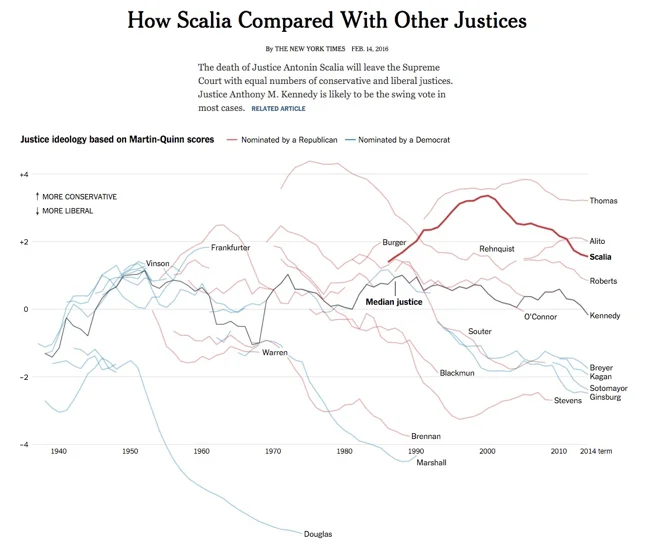
Nathaniel started the company in May 2009 and released the Visual History of the Supreme Court of the United States (SCOTUS) (which you see above) as their first infographic poster. 

Here’s the interview with Nathaniel:


Cool Infographics: What software applications do you use for the Timeplots posters?

Nathaniel Pearlman: So far we have programmed our graphics in the R language and done some final design work in Illustrator. I’m interested in hearing about other platforms to use for complex data and layout — especially other software applications that would allow us to create interactive and print versions from the same code base.


Cool Infographics: Can you describe your design process?

Nathaniel Pearlman: We start by asking ourselves what an informed audience would want to know about the subject we’re tackling. For example, for the presidential print, we asked ourselves, “Why is each president important? Why should people care about these guys? What is measurable about the context in which they served, and how could we show that?”

Then we go through a data collection phase: we take some time to see what data has already been collected on the subject, we catalog sources, and then we obtain data (and rights, if necessary) for the information we need. We wait until we have the hard data and have examined it and visualized it in several ways before we settle on what stories we can pull out of it.

The primary phase of the design process is iterative – there is a lot of trial and error. For example, we programmed (and scrapped) several major design ideas for our Senate print before settling on the current version. It turns out that our process is longer and more involved than I expected. Each print thus far has taken many months of data collection, design, and review. We also included quite a number of reviewers into our design process, folks with substantive expertise and designers as well.


Cool Infographics: What’s the most interesting thing you learned from the data?

Nathaniel Pearlman: I like the big picture: for me, the presidential print shows a historical view into the sweep of U.S. history — a marked contrast with the more journalistic, and immediate, take on the political and economic state of the nation that we are used to seeing in the news. It lengthened my perspective on current events, and I hope that it does so for those who purchase the print.

When you see the entire span of U.S. history visualized in just a few feet of space, you see the economy bouncing up and down, the parties jockeying back and forth, the budget bumping along. The ups and downs then seem fairly routine from this perspective, especially when compared to the sensationalism of our daily headlines. The other thing that really stands out is the growth of the country since 1789, both economically (in real GDP) and in population. As to the small picture: I love seeing details of each election — what percentage of the vote did Strom Thurmond get in 1948, for example, and which states did he win — so we tried to put each election into context with a scoreboard and electoral cartogram wrapped around the curve of party control of the executive.


Cool Infographics: What was the hardest part behind designing the Presidential poster?

Nathaniel Pearlman: When you see a finished product like ours, what you miss are the hundreds of decisions that were labored over as it was created. For me, the most difficult thing is deciding when I’m done. Every time I look at a new draft, I have ideas for changes that could be made. At some point I have to say “enough is enough; we are done.” The other hard part is writing the text that’s included on the print.. just crafting short explications of each presidency is difficult.


Cool Infographics: Where are some of your favorite places that have the SCOTUS poster on display?

Nathaniel Pearlman: We are happy that the U.S. Supreme Court library displays a framed print, and the gift shop in the Supreme Court building itself carries the print. We’ve also seen many purchases by legal luminaries — we’re not legal experts ourselves, so it’s nice to see that the experts appreciate our work. A son of a current justice bought one. Also, many high school teachers from across the country have purchased prints for their classrooms (we offer discounts for educators); it’s great to see teachers showing interest in using data visualization as an educational tool.


Cool Infographics: Where do you have the posters printed, what are the printing specs and why? 

Nathaniel Pearlman: We shopped around quite a bit for a printer, because we are fussy about the results – we wanted the quality of the paper to top-notch, we needed relatively fast turnaround and reliable fulfillment, and we wanted the printing process to be environmentally friendly — all of this, of course, at an affordable cost. We currently offset-print the posters in Maryland, at Whitmore printing, and they also do our fulfillment. (Ideally, we would like to find an affordable on-demand printer who can handle our large-scale posters and fulfillment. If we found this, we would be able to sell shorter-run prints; please send me any suggestions!)


Cool Infographics: Would you share some thoughts on running a business selling infographic posters?

Nathaniel Pearlman: I am enjoying Timeplots. As a profit-generating business, it is not for the faint-of-heart. I am lucky to have some time and space to try it, but it is unlikely to run in the black for quite some time. My first company, NGP Software, Inc. (www.ngpsoftware.com) is doing well and allows me to do this on the side.


Cool Infographics: How has the Timeplots On Demand side of the business been going with private clients? 

Nathaniel Pearlman: We’ve really enjoyed working with people who aren’t necessarily familiar with data visualization — everyone who we’ve worked with has been more than happy with the results. So — if anyone reading this has a project in mind, or if you want us to create a visualization for you or your institution — let us know!


Cool Infographics: How did the process of using Amazon Mechanical Turk for proofreading work for you?

Nathaniel Pearlman: Mechanical Turk is a good method for crowd-sourcing some kinds of work. We’ve used it for three separate projects now — twice for proofreading, and once for fact-checking research. We have gotten more hits than misses, so it’s been worthwhile. Eliza manages that process and has been impressed by the level of work she has received. The Mechanical Turk worker community (“turkers,” as they call themselves) are serious about their work, and it shows. In a couple cases, a “turker” found an error that we all missed: for example, when we posted the presidential print for proofreading, one turker pointed out that we listed Vice President John C. Breckinridge as “Breckenridge,” clearly misspelling his name. Another turker noted that we had described President Taylor as dying “halfway” through his term, when in fact it was a few months prior to “halfway.”


Cool Infographics: What should we expect in the future from Timeplots?

Nathaniel Pearlman: We have a rough list of fifty or sixty more projects we would love to do. After we launch the Senate print, we will decide what is next. I would love to hear from your audience what they would like to see, and we are always looking for collaborators, if someone would like to work with us on a project that they care about. We’re always open to new ideas!


Friday
May212010

Visualizing Alcohol Use

From phlebotomist.net (a website all about blood!), the highly-colorful Visualizing Alcohol Use infographic explores the effect of alcohol 

How much alcohol can your bloodstream handle? Take a look at the graphic to check out everything from blood alcohol averages to the highest blood alcohol content ever survived (you won’t want to try this at home).

There’s no designer credited, but if this wasn’t designed by EJ Fox (@pseudoplacebo) then it was heavily influenced by his work.

Thanks to Cate for the link!

Tuesday
Apr272010

10 Tips for (journalists) Designing Infographics

This article was originally published on “Digital Newsgathering”, a class blog for Journalism 226 at San Francisco State University, Instructor: Staci Baird.  I wrote this post as a guest author, and with permission I am republishing it here.


Assuming you’re not working for a media corporation with huge graphics and statistics departments at your disposal, you may want to create some infographics for your own articles.  With today’s flood of information, infographics allow readers to quickly digest and understand complex data.  A good infographic will not only inform readers, but will also create interest and convince people to read your article similar to how good headlines and photos attract readers.  In contrast, both boring and overly complex graphics will quickly convince readers to ignore your article.

Here are 10 tips for designing better infographics (click the images to go to their original sites):


1) Be Concise: Design your infographic to convey one idea really well.  You’re not writing a scientific research paper, so don’t expect your reader to dig into a lot of detail.  This doesn’t mean you should only visualize one number, but your entire graphic should support one of the major points from the article.  You can include additional facts or information to make the infographic stand on its own, but don’t lose sight of the point you want to get across.

This example is an infographic poster I created about the caffeine content in drinks.  At this size, you can easily tell which drinks have more or less caffeine, and if you decide to view the higher-resolution image you can dig deeper into the details and additional information that’s included in the poster.

The Caffeine Poster, by Randy Krum


2) Be Visual:  Design your infographic with your final for viewing size in mind.  A number of articles online require the viewers to click on a text link to view the graphics that accompany an article, and I believe this is a huge mistake.  Design your graphics to be viewed in-line with your article.  There’s nothing wrong with allowing viewers to click the image to see a high-resolution version, but they should be able to understand the image when viewed with the article.  A side benefit is that a viewable image also allows for readers to share the image by itself on social media sites easily.

Google PageRank Explained, by Elliance


3) Be Smarter:  Build your data and explanation right into the infographic, and don’t make your readers have to work hard to understand what they’re seeing.  Your infographic shouldn’t need a legend to be understandable, and there’s no reason to ask your readers to keep moving their eyes back and forth between the chart and the legend to understand the graphic.  Treat your readers as intelligent and make your graphic look professional by including the relevant descriptions and numbers in the infographic.

Who Participates Online?, by Arno Ghelfi for Wired Magazine


4) Be Transparent:  Infographics can be used to lead readers to the wrong conclusions.  Always cite your data sources and allow readers to dig deeper into the data if they have the desire.  Some of the best articles include easy access to the source data with links to a spreadsheet for readers to view on their own.

BBC Budget, by David McCandless

See the visual. Explore the data.


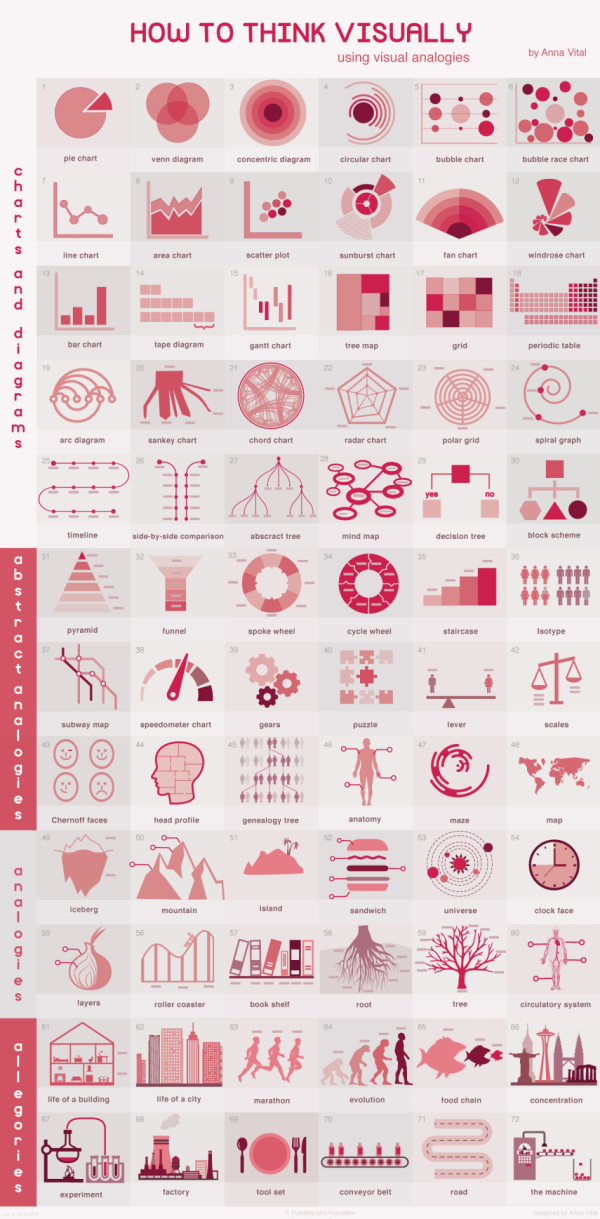
5) Be Different:  If you can avoid it, don’t use a bar chart, a line chart or a pie chart.  This infographic of visualization styles is a great resource to help determine a good visual to use for your data.  The different styles are grouped together by the type do data they are trying to communicate and in the interactive version, an example is shown as you mouse over each style.

Periodic Table of Visualization, by Visual-Literacy.org


6) Be Accurate: Remember your geometry and visualize differences using area.  When trying to convey the scale of your data, many graphics use different sized shapes or images to show amounts relative to each other.  The reader’s eye sees the total area of the image as indicative of scale, not just the height of the image. 

For example, if you’re using circles to show one number is 3 times larger than another, the area of the circle must be in proportion to the values being represented.  If you make the mistake of making the diameter of the circle 3 times larger, the area is actually 9 times larger.

Circle Areas, by Randy Krum

The infographic below breaks down the number of FedEx trucks using the area of the circles in a mind map style image.  This could have been a simple bar chart, but it’s much more visually appealing as a bubble mind map.

The Fedex Universe, by Robin Richards for MeetTheBoss.tv

NOTE: One common exception to this is a standard bar chart.  No matter how wide the bars are, the height is the only dimension that conveys meaning.


7) Be Attractive: Include visuals:  Illustrations and photos included in the infographic make a big difference.  Even though this example is a bar chart, the inclusion of the company logos make it quicker and easier for the reader to understand.

What Does Your Email Provider Say About You?, by CreditKarma.com


8) Be Varied:  Find a good visual style that’s right for the data you’re trying to share.  If your data is about countries, plot it on a world map not a bar chart that lists countries.  Also, don’t be afraid to mix visualization styles together in one infographic.  

This example infographic by Emily Schwartzman about the aftermath of the earthquake in Haiti won a design contest from GOOD Magazine, and mixes map data with a stacked bar and colored boxes for percentages.  This is also a great example of viewing size.  You can see and understand the visuals, but the actual numbers are available if you view the high-resolution version.

Haiti Earthquake Infographic, by Emily Schwartzman


9) Be Gracious:  Work on the assumption that your infographic may be viewed or shared without the article you originally designed it for.  Make sure that the final graphic includes the following pieces:

  • Copyright, to be explicit about any rights and terms of use
  • Source data, so anyone can check your facts
  • Designer’s name, always give credit to the artist/illustrator/programmer/designer
  • Original image/article address, so anyone who sees the image can find your original article


10) Be Creative:  Use whatever tools you have available to create your infographic.  Of course, the tools you use will depend on what you are trying to visualize.  Many infographics can be created using simple applications like a vector drawing program (like OmniGraffle or Microsoft Visio), a charting program (like Microsoft Office or Apple iWork) or an image editing program (like Adobe Photoshop).

Here are some visual tools available on the Internet: 

Thursday
Apr152010

The Feltron Annual Report 2009 and an Online Class April 29th

I’m not sure how it slipped off the radar, but I haven’t posted a link to the Feltron Annual Report 2009 here on the blog yet.  Nicholas Feltron has done infographics for Time, CNN, Wired, New York Times, Fast Company and more, but probably his most popular infographics are his annual reports.  The print version of the Feltron Annual Report 2009 is available for pre-order for $30 from the Feltron Store.

Mike Aruz interviewed Nicholas Feltron when the 2009 Annual Report was released on mikearauz.com

The reason this came up today is that Nicholas is going to be the host of Live DesignCast: Nicholas Felton, A Master Class on Information Design.  This is an online class from PRINT Magazine on April 29, 2010 at 4pm EST.  The class costs $69 and is one hour long.

Our current information age has produced an inevitable crush of complicated data to sort through. Thankfully, there is a rising group of designers who present all this data in a way that we can understand and use. And for the last several years, no one has done it better than Nicholas Felton. 

In this Master Class, Felton explains how detailed data leads to better stories, offers a few guidelines for displaying complicated data sets, and challenges you to use all five senses through the process. 

In this Master Class DesignCast, you’ll learn: 

• How to visualize large data sets
• How to go from an initial question to gathering, comparison, and display 
• How to use sensors, whether hardware or software, to gather data
• How data helps satisfy curiosity, provides insight, and entertains
• How better data leads to better stories

Tuesday
Apr132010

An Infographic Evolution of the Bra

This two-panel infographic on the Evolution of the Modern Bra was designed by Suzi Slavik for an assignment in her information graphics class at Ohio State University.

The first panel is devoted to social influences, industry leaders, and shifts in fashionable silhouettes. The second panel discusses historical milestones, significant fabrics used, and the bra fitting procedure.

The assignment was to choose any sequence, cycle, or evolution and represent it graphically. The information was to be presented in two separate panels that were related but could also function independently of one another.

Thanks to Matt for the link!