Data Visualization, Infographic Design, Visual Thinking, Product Development and Marketing professional fascinated by good infographics. Always looking for better ways to get the point across.
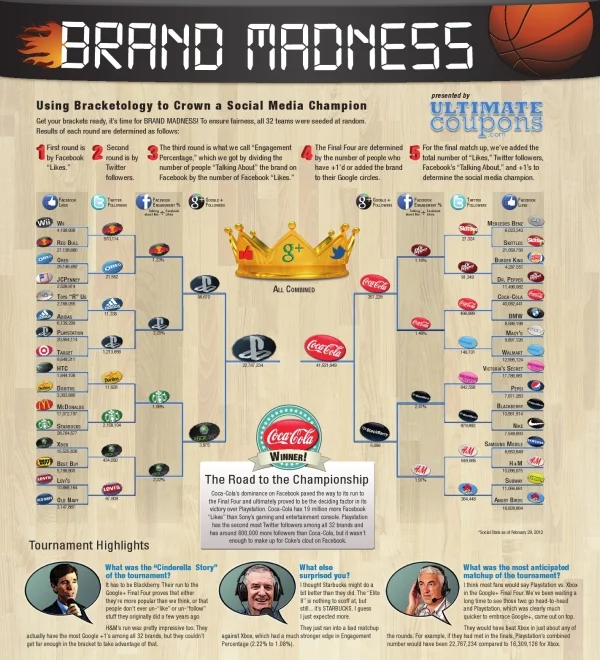
Brand Madness! Using Bracketology to Crown a Social Media Champion is a fun infographic design during the NCAA basketball tournament that uses social media scores to determine winning match-ups. From UltimateCoupons.com, this design is a great example of taking boring data (Facebook likes and Twitter followers are available to anyone) and using infographic design to make it fun and engaging to the readers.
March Madness has officially arrived, but the UltimateCoupons.com team has Brand Madness! While everyone else’s mind is on basketball, we decided to fill out a bracket pitting 32 of the world’s most popular brand names against each other with the winners and losers being decided by social media popularity.
This is a great use of the visual company logos and the bracket structure to show the readers all of the match-ups, and you can look closer to see the actual numbers if you want to. Only a year or two ago, this type of blog post would have been all text and a table of numbers, but this is a simple and very effective use of design to grab the readers’ attention.
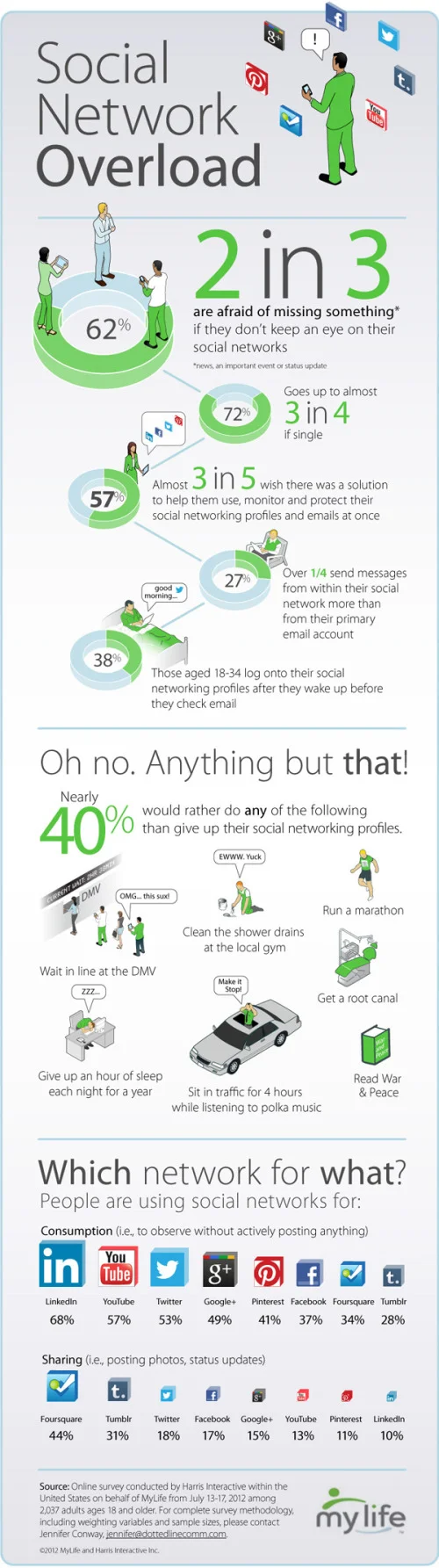
This is a LONG one, but a good one based on statistics recently published in AdAge. Social Media Stats of the Day from Dream Systems Media visualizes some fo the recent stats about Favebook Twitter and general Social Media usage.
I really like the coloring in this design that visually ties the data to the Facebook and Twitter brands instantly for the readers. Although, big fonts don’t make a data visualization, and a number of percentages included could easily have been visualized as simple pie charts or stacked bar charts. I do think there is too much text in the design, but I can appreciate how specific you have to be when describing the research data and where it came from.
The new 2012 Death & Taxes poster has been released, and this year it’s better than ever. Designed by Jess Bachman (ByJess.net) this poster visualizes the 2012 proposed U.S. Federal Budget. The Death & Taxes poster is one of the best infographics I’ve ever seen, and it gets better every year.
“Death and Taxes” is a large representational graph and poster of the federal budget. It contains over 500 programs and departments and almost every program that receives over 200 million dollars annually. The data is straight from the president’s 2012 budget request and will be debated, amended, and approved by Congress to begin the fiscal year. All of the item circles are proportional in size to their funding levels for visual comparison and the percentage change from both 2012 and 2002 is included so you can spot trends.
PURCHASE: This year, Jess also had the opportunity to partner with Seth Godin and his Domino Project to make the full-size 24” x 36” poster available for purchase through Amazon. Currently, you can purchase a copy of the poster for $19.99. Also, check out Jess’s video introduction on the Amazon page.
POSTER GIVEAWAY: Cool Infographics is giving away one FREE copy of the poster. The free poster will go to one randomly chosen person that tweets a link to this blog post on Twitter and includes the hashtag: #deathandtaxes. I included the hashtag in the post title, so any retweets will be automatically eligible. NOTE: you must also be following me on Twitter (@rtkrum) so that I can send you a direct message if you have won!
I will choose the winner at 12 noon (Central Time) on Friday, November 11, 2011 (11/11/11). I will contact the winner, and order the poster from Amazon to be delivered to the winner.
INTERVIEW: Similar to last year, Jess was willing to answer some behind-the-scenes questions about this year’s poster:
Cool Infographics: What’s the most interesting thing you learned from the 2012 data?
Jess Bachman: Lots of reductions in the military side. It’s mostly from the OCO war funding, but its interesting to see what actually is getting cut the most. Mostly Army funding and RDT&E across the board. I would think the OCO was mostly Operations and Procurement.
Cool Infographics: Has you design process changed at all this year? What software did you use to help dig through the data and create the design?
Jess Bachman: Well this year I tried to work exclusively within the official spreadsheets, rather than pick out the numbers from the paper (PDF) budget. I think it’s more accurate and easier to get totals. Mainly just used excel and photoshop as always.
Cool Infographics: When did the 2012 data become available, and how long did it take you create this year’s poster?
Jess Bachman: It was supposed to be released in February but it was a month late. I started moving on it at a full clip then got involved with Amazon/Godin and the timelines shifted quite a bit, so while I usually get the post out in April, it was released in September this year.
Cool Infographics: How did working with Seth Godin and the Domino project come about?
Jess Bachman: Seth just emailed me out of the blue. We talked and it seemed like a no-brainer.
Cool Infographics: How does working with Amazon and the Domino project change how you print and distribute the poster?
Jess Bachman: Well previously my Mom did most of the shipper and I also had a 3rd party do fulfillment and shipping. It’s a rather time consuming and frustrating process. Sending out orders, doing customer support, paying vendors, etc. Now it’s all in Amazon’s hands. They got it printed and of course are warehousing and shipping it too. I’m quite glad as they do a much better job of shipping than I do. Of course they also take their cut of the profits. As for Domino, they have their own distribution channels and lists and also work closely with Amazon to make sure the product page is well presented too. This year it reached #18 on the best sellers list. I guess that makes me a best selling author. I don’t think I could have accomplished that without Domino/Amazon.
Cool Infographics: I see you made a video to include on the Amazon page, how was that experience?
Jess Bachman: Seth told me they needed a video ASAP so I just made one that afternoon. I suppose I would put more effort into it next year but videos help sell products and i think it does a good job of that.
Cool Infographics: Any new design features added to the poster this year?
Jess Bachman: I wanted to include some non-governmental items in the poster this year for reference. They are in the bottom left and include things like the size of the video game industry, bill gate’s net worth and other such things. When talking about billions of dollars all the time, sometimes you need to get out of government-mode to put those figures into further context.
Cool Infographics: The past posters have been shared very heavily in social media, which social sharing sites have you found most successful?
Jess Bachman: Well, Digg has traditionally been a big asset, but then Digg fell apart so I no longer pay attention to it. In general, I have abandoned the traditional accelerants like Digg, reddit, etc. and instead focus on my network of bloggers and influencers. Combine that with Facebook liking and you can really spread something.
Cool Infographics: Last year we talked about some favorite places that have the poster on display. Any new ones this year?
Jess Bachman: Well, with a larger audience and hopefully more sales, the poster will be everywhere. Unfortunately, I get lots of requests for discounts for schools with tight budgets, but I have no control over price anymore. I can say that an iOS app is in development so that will be interesting. My ultimate goal is to get on the Daily Show to talk about the poster in April. People constantly tell me I need to be on there, and I’m a huge fan, so I figure I have a good shot, just need to nag the right people.
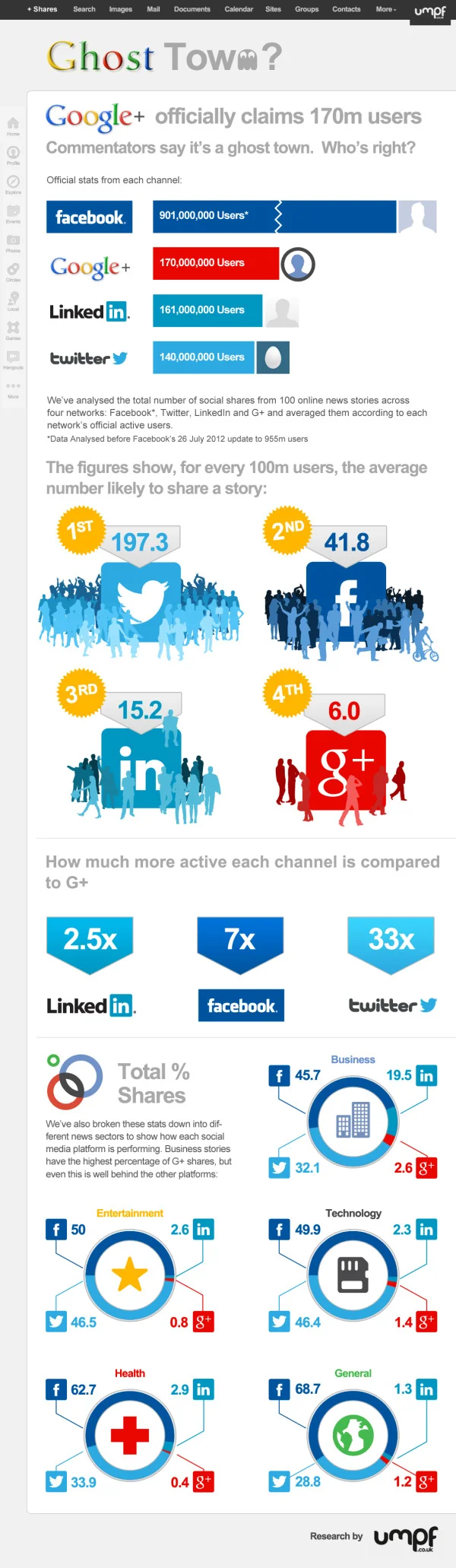
We then analysed the results to bring what we believe is the most up-to-date snapshot of social media usage in the UK. If you like statistics, you can view them all here.
Our infographic, created by Vapour, helps visualise statistics; it outlines the gender and age differences in social media usage.
It needs a title.
I love that they included a link to the data file in GoogleDocs in the original posting.
I like the idea of the Man/Woman stacked percentages. Although, I’m guessing they didn’t calculate the icon shape areas to get the section sizes right, which makes the visualization false. They probably just calculated the height of each section, which visually misinterprets the data. YouTube is shown to be much bigger than it really is because the shape is widest there.
They don’t need the Key/Legend at the bottom (“Legends are Evil”). The social media icons were clearly used in the first bar chart, and could have been included in them all for clarity. Build the data right into the charts, and you don’t need a legend.
At the bottom should be a copyright (or creative commons license), the URL to the original infographic, the Umpf company logo, the sources listed and the designer credit. Once this infographic is posted elsewhere on the Internet (like here on the Cool Infographics blog) all of the information that was included in the original posting is lost. (unless a good blog author, like me, includes the links)
From Moritz Stefaner on Visualizing.org, comes the VIZoSPHERE project (Click the image to see the high-resolution image viewer). Using GePhi, Moritz started with 18 seed accounts on Twitter, and then mapped 1,645 of the connected, networked accounts that relate to data visualization. Bubble size in this visualization shows how many followers each account has from within this DataViz pool of users.
This map shows 1645 twitter accounts related to the topic of information visualization. The accounts were determined as follows: For a subjective selection of “seed accounts”[1], the twitter API was queried for followers and friends. In order to be included into the map, a user account needed to have at least 5 links (i.e. follow or being followed) to one of these accounts. The size of the network nodes indicates the number of followers within this network.
The zooming interface is crucial to view such a highly-detailed visualization and be able to read any of the nodes. I was about to find my own Twitter account (@rtkrum), but it would be nice if Moritz would also provide a listing of the Twitter accounts or some way to search the map.
Another good infographic from Fixr.com about the how the real estate industry is changing. Social Medai Killed the Blog Star: Real Estate looks at how buyers are finding their information online and who are the most influential blogs and real estate people on Twitter.
I like the use of company logos and Twitter profile images. I also like that all of the data is built-in to the pie charts and bar charts to make it easier for the readers to comprehend.
The side-by-side Top 10 lists are interesting, but because they’re based on different measurements (followers vs. Alexa page rank), the graphic should give the reader some context of how to compare the different values. Why do these lists support the overall message that social media is more important than blogging?
Some major technical errors as well. Pie chart percentages should ALWAYS add up to 100%. The pie charts here add up to 71%, 99%, 91% and 100%, which means that the visual of the slice sizes doesn’t match the data. You never want your data visualizations to tell a story that isn’t supported by the data.
The real estate industry has seen a number of social media innovations over the past few years. Real estate pros are using social media to provide online property tours, schedule showings and showcase local expertise.
Alexis Lamster, VP of customers at Postling and creator of the infographic below, told us that the company analyzed more than 500 Postling accounts specific to real estate and more than 7,000 small business accounts to extract information on how the real estate industry is using social media.
Although the infographic is made up of mostly pie charts and bar charts, it clearly communicates the information in a clean, easy-to-read format.
Jeff Clark at Neoformix has created a cool, interactive tool that visualizes word frequency in a specific Twitter stream called Tweet Topic Explorer. You can enter anyone’s Twitter ID and it will generate an interactive visual on the fly. Above is the visualization of my Twitter ID: @rtkrum. According to Jeff (see note below), this works in most browsers but has trouble with Microsoft Internet Explorer.
Similar to a word cloud, the area of the circles is sized based on the frequency of that word in the Twitter stream. Words are clustered together and color-coded if they are often found together in the same Tweets. The actual text of the Tweets is displayed next to the visual, so you can click on any word and it’s highlighted in the text as well. Clicking on any Twitter names in the text will generate a new visualization for that Twitter user.
One issue I have is that the font size of each word is adjusted to fit within it’s circle, so longer words are naturally smaller to fit on one line withing the circle. So even if a long word has a higher frquency (and a larger circle area) it appears smaller to the reader’s eye because the font is so small.
I have created a new tool to help see which topics a person tweets about most often. It also shows the other twitter users that are mentioned most frequently in their tweets. I call it the Tweet Topic Explorer. I’m using the recently described Word Cluster Diagrams to show the most frequently used words in their tweets and how they are grouped together. This example below is for my own account, @JeffClark, and shows one word cluster containing twitter,data,visualization,list,venn, and streamgraph. Another group has word,cloud,shaped,post etc. It’s a bit hard to see in this small image but there is a cluster about Toronto where I live and mentions of run, marathon, soccer. Also, there are bubbles for some of the people on Twitter I mention the most often: @flowingdata, @eagereyes, @blprnt, @moritz_stefaner, @dougpete.
This application was created with the wonderful tool Processing.js which is the javascript-based extension of the Processing tool I have used in the past. Performance is very good with the Chrome browser, and decent in Firefox and Safari. It will not work in Internet Explorer (except perhaps the new IE 9) and currently crashes on iOS devices.
Anyone out there still reading? Generate a visualization using your Twitter ID and post a link in the comments!
Are colleges using social media as part of the student admissions process? Schools.com explored this topic with the Reading Students like an Open Facebook infographic. It’s hard enough to get teenagers to understand that online photos and status updates will be a permanent record of their behavior for the rest of their life, but even more immediately it could impact their entrance into college!
As Facebook has become more and more popular—if it were a country, it would be the third largest in the world—its use in the field of education has expanded, too. In fact, more than 80% of college admissions officers report using Facebook as part of their recruiting process.
Are admissions officers really looking at the Facebook profiles of prospective students? And if so, are they making admissions decisions based on these profiles? Below is an infographic that highlights the answers to these questions and more—which might surprise you.
It goes without saying that Facebook is the network du jour, but even though the reigning champion’s user stats keep soaring, social networking as a whole might be leveling off. Nevertheless, there are still scores of other highly competitive social sites that are waxing and waning; and different networks and apps are more popular in specific geographic areas, with certain genders or age groups, and even among various social classes.
For example, Plaxo is the network with the most users over the age of 65. Facebook is more popular with women, but Digg and Reddit tend to be more popular with men. LinkedIn is the “richest” social network, but Plurk outranks it when it comes to well-educated users who have graduate degrees.
They have a ton of traffic data to work with, and this infographic does a good job of summarizing some of the key findings at the top level.