About

Randy Krum infographic designerRandy Krum

President of InfoNewt.
Data Visualization, Infographic Design, Visual Thinking, Product Development and Marketing professional fascinated by good infographics.  Always looking for better ways to get the point across.

Infographic Design


InfoNewt Infographic Design

Search the Cool Infographics site

Custom Search


Subscriptions:


Feedburner

The Cool Infographics Gallery:

How to add the
Cool Infographics button to your:

Cool Infographics iOS icon

- iPhone
- iPad
- iPod Touch


Read on Flipboard for iPad and iPhone

Featured in the Tech & Science category

Flipboard icon

Twitter Feed
Caffeine Poster

The Caffeine Poster infographic

Google Insights

Entries in news (56)

Thursday
Feb072013

Syria: The Basics, an infographic presentation

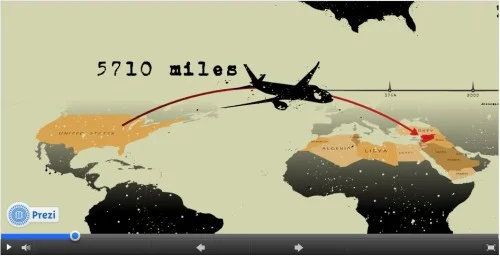
Syria: The Basics is an infographic slide show using the Prezi presentation tool.  It plays like a movie, and does a great job utilizing the new features of Prezi like Fade-In animation and Audio Overlay.

Designed by Lara Setrakian (@Lara), co-founder and managing editor of Syria Deeply, a single issue news website.  Fantastic design work!  The presentation utilizes data visualization design concepts including relative sizing to put the size of the country into perspective, a timeline layout of events, related news photos and world map information.

Syria: The Basics, an infographic presentation

Thursday
Aug182011

The Power of Data Visualization: iPhone Tracking

Inofrmation is power.  Data visualization has the power to change the world!  Change our habits, our laws, our business strategies and what we understand about the world around us.  Our understanding of data forms the foundation of how we make choices, form opinions, and at least one study claims that up to 80% of the human brain is wired just to interpret and remember visual data.

Anyone reading this blog has a basic understanding that data visualization makes things easier to understand.  It puts data into context and allows the viewer to see large data sets summarized in a much smaller space.  I’ve avoided updating to the latest iOS on my iPhone until I could put together this post since it’s such a great example of how visualizing data turns it into information that people can use.

Earlier this year, Alasdair Allan and Pete Warden announced at the Where 2.0 conference that Apple’s iPhones were tracking all of your location data in an open, accessbile file on your computer.  ALL of the location data since the phone was first turned on, which could be years of data.  Heavily covered by the press, you can see their announcement here.  The reason I bring this up on Cool Infographics, is that I believe the visualization itself is what caused this to become a major media event sometimes referred to as “Locationgate.”

Some industry and forensic experts knew about this data already, and many others had tried to to make the public aware of it without any success.  Just telling people that your cell phone is storing location data doesn’t make it real and personal enogh to get the press and the public to care.  In fact, there have been other stories that Google’s Android and Microsoft’s Windows Phone 7 also gather this tracking data, but only Apple’s data was turned into a visualization and captured attention.

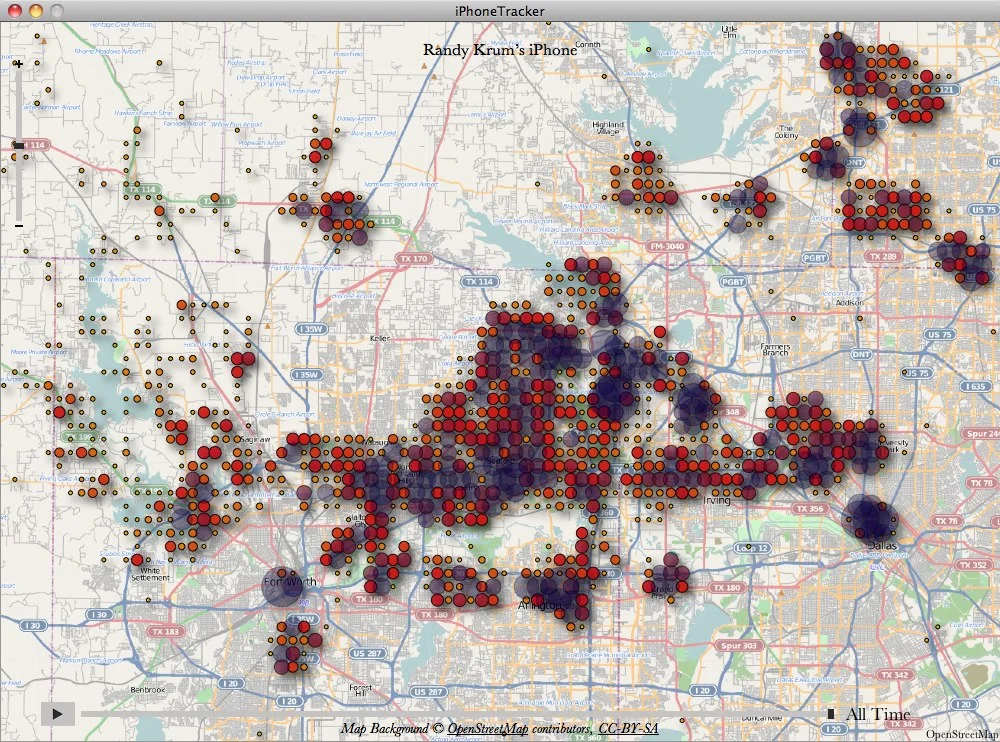
Alasdair and Pete wrote a simple application that anyone could download and use to see their own location data visualized on a map.  This not only made the story more understandable but it made it personal because I could see my own data.

We’d been discussing doing a visualization of mobile data, and while he was researching into what was available, Alasdair discovered this file. At first we weren’t sure how much data was there, but after we dug further and visualized the extracted data, it became clear that there was a scary amount of detail on our movements. It also became obvious that at least some other people knew about it, but it wasn’t being publicized.

iPhoneTracker is an open-source project that visualizes the location data that your iOS device is recording.

Created by Alasdair Allan and Pete Warden using the OpenStreetMap and OpenHeatMap frameworks.


As you can see above, they were even nice with data, and aggregated it into a simple grid that isn’t the actual GPS locations or location of the cell towers.  (This shows my trip to DisneyWorld in Florida)  The size of the circles shows the frequency of data points within that specific location.  So the visual shows an approximate location, but the actual data file on the iPhone was much more detailed.  Of course, the application was open source, so others started playing with the code and created much more detailed versions of the software.  Here’s that same data using the Creepy Edition of iPhoneTracker:


I believe that this use of data visualization to communicate the story was the primary factor that caused a media furor, lawsuits, press releases, interviews, government hearings and proposals to change our laws.

Apple posted an official press release responding to all of the attention and released a software update that deletes most of the historical data.  Sadly, the next time I update my iPhone, the historical data will all be erased.  Personally, I wish I had the option to continue to gather my own data because I’m into this sort of thing.  This file is now also encrypted if you turn on “Encrypt iPhone Backup” so it’s no longer easily accessible.


What’s the point?  Data visualization can be used to make your information relevant to your audience and get their attention.  Don’t just tell people your story, show them.


Wednesday
Mar232011

Japan: The Earthquake & The Tsunami [infographic]

Japan:The Earthquake & The Tsunami is a good infographic design from the team at DigitalSurgeons.com.  I like the simple color scheme, and the mix of different types of visuals for the different pieces of data.  Maps, bar charts, icon grids and a ruler all help put the currently available information into perspective.

The bottom also lists some of the major support links for people that would like to help.

Thanks to Peter for sending in the link!

Monday
Feb072011

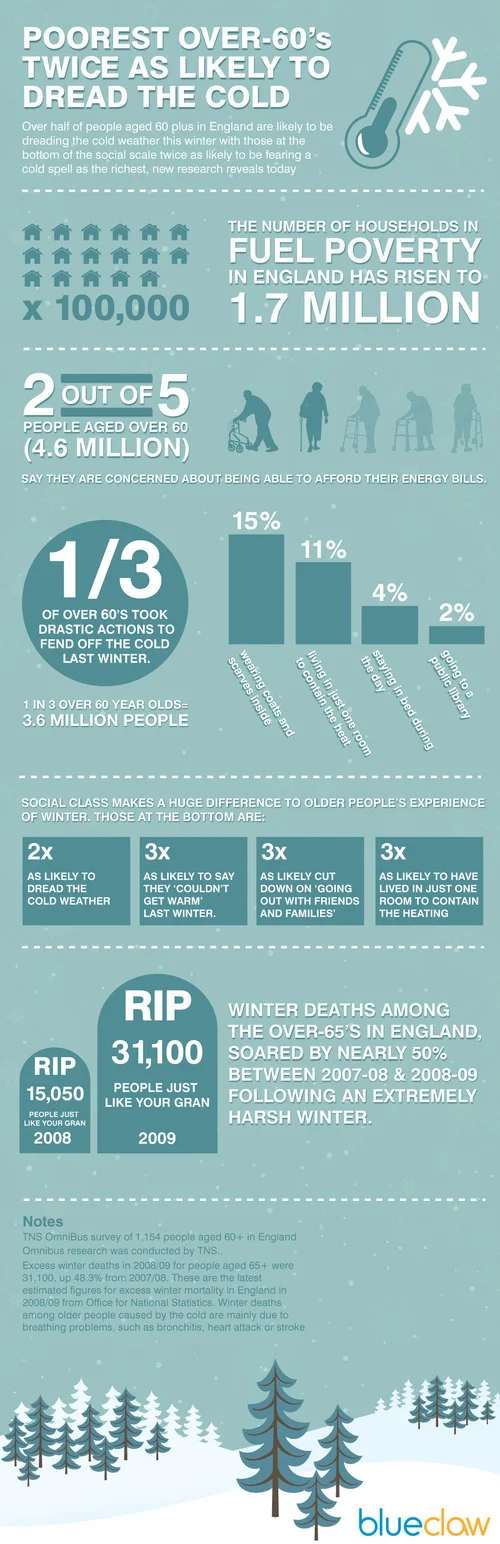
Fuel Poverty with the Over-60 Crowd in England

Click for larger image

EDITED by request of the source:

From Blueclawsearch.co.uk, a great use of infographics in your marketing strategy is in coordination with a press release to help communicate a message to your audience. 

The press release was of course sent out to the normal sources, but the infographic can have a life of its own.  The infographic has the additional ability to reach their audience directly, and be shared on the Internet in ways that a press release never would.

Here’s the press release that went out in conjunction with the infographic:

PRESS RELEASE for immediate release

DATE: 3rd February 2011

Blueclaw Highlights Study on Fuel Poverty Amongst Over 60s in England

This infographic created with the intention of providing a visual impact of how the elderly over 60s are coping in the freezing winter months. These figures are from a recent study on fuel poverty and the over 60s in England*.

Fuel poverty is a real and rising problem in England - 4.6 million people aged over 60 are worried about being to afford heating bills. Furthermore, 1 in 3 over 60’s had to resort to drastic measures to fend off the cold, such as going to a public library. Also according to the study, winter deaths between 2009 and 2010 have totalled more than 23,000.

Too many times and too often, statistics and data from important studies are ignored not because the findings are not urgent, but because most people find it hard to process numbers and jargon easily. AgeUK has recently done a study on how fuel poverty is affecting the over 60s in the UK. This infographic was designed by Blueclaw, to create a visual impact of the study. This social awareness campaign coincides with Fuel Poverty Awareness Day (11th February), a national awareness-raising media and public affairs campaign with an aim to urge MPs to focus their surgeries that week, on helping those who are in or at risk of fuel poverty.

*Study taken from: http://www.ageuk.org.uk/latest-press/archive/poorest-over-60s-twice-as-likely-to-dread-the-cold-as-the-richest-says-age-uk/
More info on Fuel Poverty Awareness Day: http://www.nea.org.uk/fuel-poverty-awareness-day-2011/

I do have a couple issues with the infographic design itself.  Why are the squares that are “2X and 3X as likely” the same size?  Why is 1/3” represented in a solid circle (looks like a pie chart, so it should show a 1/3 slice)?  The grid of 17 houses representing 1.7 million is 6 houses across, which is hard for most readers to comprehend.  We live in a base-10 world, so the grid should be 5 houses wide.

Thursday
Jan062011

The 2010 Year in Review #infographic


OnlineSchools.org has released the 2010 Year in Review zoomable infographic summarizing the major events of 2010.  The zoomable version is below, and it’s best viewed in full-screen million.

I have mixed feelings about this one.  Using the outer space metaphor, there are 15 major news categories with text descriptions of a handful of events in each.  Each event has a small celestial body illustration related to it, and a measure of blog posts and tweets on Twitter related to the event.


It really does need the zoomable feature, because the font sizes are dramatically different between the titles and the text.  That does make it difficult to read sometimes.  I noticed the Star Trek font used as well as part of the sections.

In the corners are some visualizations of things like Top Memes, Top Songs, Twitter Trends, Yahoo Searches and Google’s Fastest Rising Searches.


I think this one is missing good sources for where their information came from, a designer listing, some of the text s too small and in some cases is more illustration then infographic.  Overall it’s fun to zoom around and appreciate the details they’ve included.

Thanks Brittany!


Thursday
Dec162010

DataStore - Launched at The Guardian


Today, the Guardian, home of the DataBlog, has launched a new site as the home for their data journalism, DataStore.


From Simon Rogers, Editor of the DataBlog and the DataStore:

Today we launch a new gateway to our data journalism and visualisations - find out what’s new at guardian.co.uk/data.

Data journalism has become an increasingly big part of our work here at the Guardian - from Wikileaks to government spending, it’s our job to make the key data accessible and easy to understand.

As Tim Berners-Lee said recently:

[Journalism is] going to be about poring over data and equipping yourself with the tools to analyse it and picking out what’s interesting. And keeping it in perspective, helping people out by really seeing where it all fits together, and what’s going on in the country

So, we’ve pulled all our data journalism into one new place: guardian.co.uk/data.

Besides our award-winning datablog, the site includes:
• The key data of the day - broken down for you
• Our pick of the data blogosphere - which sites have the key posts?
• Search the world’s government data - and global development data
• What have you done with our data? Featured apps

We’ll be adding new features and changes over the next months. What would you like to see?


Wednesday
Dec302009

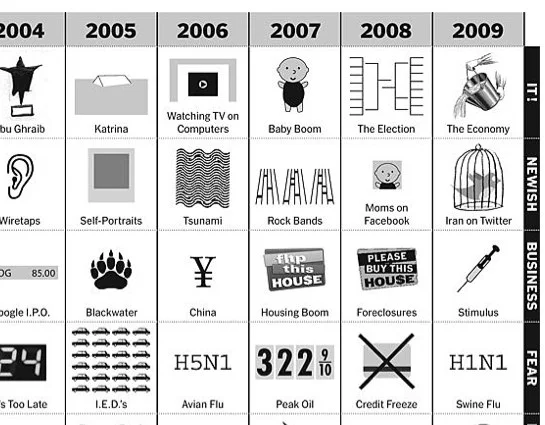
The Last 10 Years...Visually


Great chart by Phillip Niemeyer over on NYTimes.com, Picturing the Past 10 Years.  Using icons and unique pictures, Phillip captures the key event of each year in 12 different categories.

Found on FlowingData, WeLoveDataVis, and it was tweeted but a few people on my Twitter list, Cool Infographics People.

Friday
Dec182009

Word Spectrums! The Online Infographic Battleground


On Chris Harrison's site, there are a number of graphics that he calls Word Spectrums.  More like a battleground, Chris is using the enormous amount of data from websites that has been made public by Google.  This is an advanced form of a word cloud that visualizes related words and their relative connections to the two topics.  (FYI, since this is based on raw Google data, foul language does appear in some of them).


Using Google's enormous bigram dataset, I produced a series of visualizations that explore word associations. Each visualization pits two primary terms against each other. Then, the use frequency of words that follow these two terms are analyzed. For example, "war memorial" occurs 531,205 times, while "peace memorial" occurs only 25,699. A position for each word is generated by looking at the ratio of the two frequencies. If they are equal, the word is placed in the middle of the scale. However, if there is a imbalance in the uses, the word is drawn towards the more frequently related term. This process is repeated for thousands of other word combinations, creating a spectrum of word associations. Font size is based on a inverse power function (uniquely set for each visualization, so you can't compare across pieces). Vertical positioning is random.


Chris has created and shared a number of different versions on the Word Spectrum page of his website, and you can see high-resolutions PDFs of each there.

Want to try your own?  Building on Chris' idea, Jeff Clark from Neoformix has created interactive Word Spectrums using either Twitter or News as the source that lets you enter your own terms to compete.  I especially like the idea of pitting two competing brands against one another.


Wednesday
Oct282009

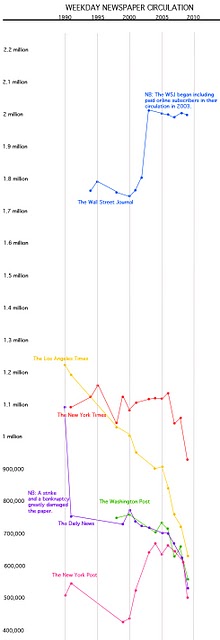
A Graphic History of Newspaper Circulation


From The Awl, this certainly isn't the prettiest infographic I've ever seen (it's basically just a line chart), but it tells it's story to the viewer very well.  Maybe there are times when a simple chart from Excel can do the job...NAH.   From a title that proclaims "A Graphic History of Newspaper Circulation" we certainly expect much more visual information.

I'm sure many of the graphic designers reading this blog could turn this data into a significantly better infographic (hint, hint...).

Every six months, the Audit Bureau of Circulations releases data about newspapers and how many people subscribe to them. And then everyone writes a story about how some newspapers declined some amount over the year previous. Well, that's no way to look at data! It's confusing—and it obscures larger trends. So we've taken chunks of data for the major newspapers, going back to 1990, and graphed it, so you can see what's actually happened to newspaper circulation. (We excluded USA Today, because we don't care about it. If you're in a hotel? You're reading it now. That's nice.)
Some surprising trends: the New York Post has the same circulation it had two decades ago! Also, the once-captivating battle of the New York City tabloids has become completely moot.
Some unsurprising trends: the Los Angeles Times is an absolute horrorshow. Not shown: the Boston Globe disappearing off the bottom of this chart, in a two decade decline from 521,000 in 1990 to 264,105 this year.
Found on Daring Fireball.

Thursday
Sep102009

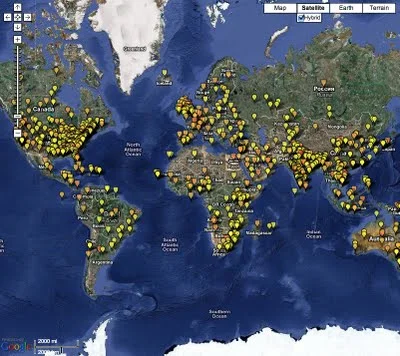
HealthMap: The Global Disease Alert Map


HealthMap.org is an online map tool that locates any reports of disease from a selection of news sources.  Available in multiple languages, HealthMap is a great use of the Google Maps API.  In fact, HealthMap is funded by Google, which explains why they are so dependent on the Google Maps data.
HealthMap brings together disparate data sources to achieve a unified and comprehensive view of the current global state of infectious diseases and their effect on human and animal health. This freely available Web site integrates outbreak data of varying reliability, ranging from news sources (such as Google News) to curated personal accounts (such as ProMED) to validated official alerts (such as World Health Organization). Through an automated text processing system, the data is aggregated by disease and displayed by location for user-friendly access to the original alert. HealthMap provides a jumping-off point for real-time information on emerging infectious diseases and has particular interest for public health officials and international travelers.
They also recently launched an iPhone app called Outbreaks Near Me, available for free in the iTunes app store.  The app allows you to view the maps from your iPhone and get alerts for outbreaks in your area.