About

Randy Krum infographic designerRandy Krum

President of InfoNewt.
Data Visualization, Infographic Design, Visual Thinking, Product Development and Marketing professional fascinated by good infographics.  Always looking for better ways to get the point across.

Infographic Design


InfoNewt Infographic Design

Search the Cool Infographics site

Custom Search


Subscriptions:


Feedburner

The Cool Infographics Gallery:

How to add the
Cool Infographics button to your:

Cool Infographics iOS icon

- iPhone
- iPad
- iPod Touch


Read on Flipboard for iPad and iPhone

Featured in the Tech & Science category

Flipboard icon

Twitter Feed
Caffeine Poster

The Caffeine Poster infographic

Google Insights

Entries in circles (3)

Thursday
Aug252011

OUTBREAK: Deadliest Pandemics in History


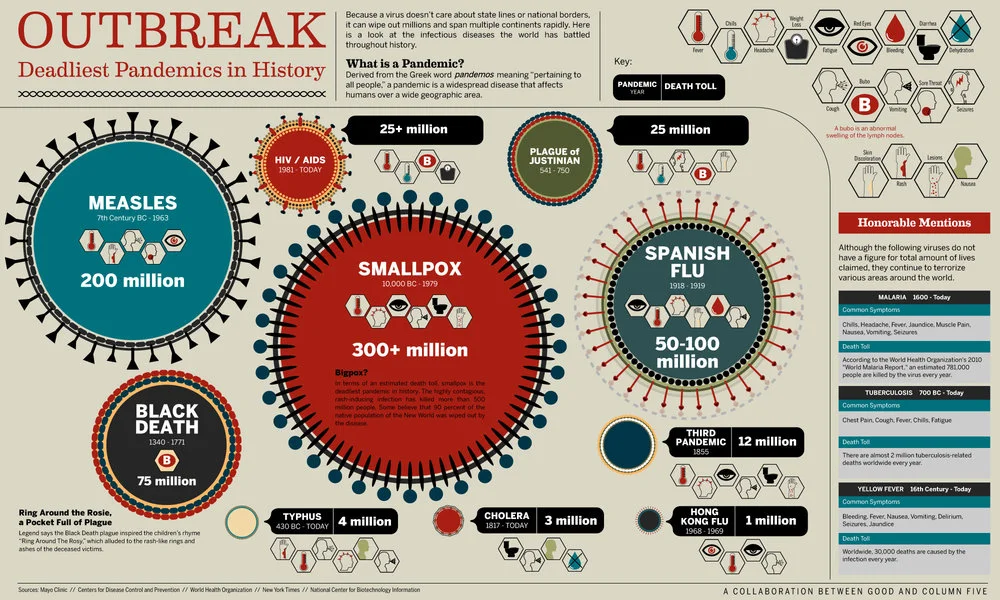
OUTBREAK: Deadliest Pandemics in History is a cool collaboration between GOOD magazine and Column Five Media.

From the Black Death to the measles, rapidly spreading diseases have taken a toll on humanity for centuries. Here’s a look at the biggest and deadliest pandemics ever.

I like the circles for each disease sized to the death toll, and illustrated to look like a virus molecule.  I can’t tell if the extra design elements around the circumference of the circles are part of the circle size or not.  The readers’ eyes see the area of each circle to represent it’s relative death toll compared to the others, but looking at the Measles circle, which radius do you see as the size of the circle?  The solid black line or the outer reaches of the appendages?  I think arguments could be made both ways.

Although I personally don’t like legends, the hexagons to indicate all of the different symptoms of each disease work nicely.  The shape implies scientific information, and the designer spend some time designing icons for each symptom.

This design works very well as an informative piece, and is clear to the reader to understand.  This one will probably have a long online lifespan.

Found on Visual News.

Friday
Apr222011

The Tweet Topic Explorer


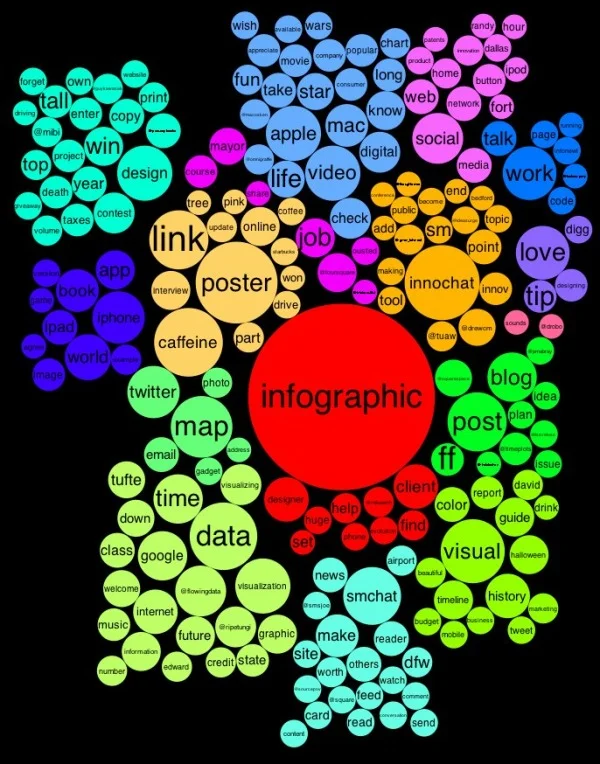
Jeff Clark at Neoformix has created a cool, interactive tool that visualizes word frequency in a specific Twitter stream called Tweet Topic Explorer.  You can enter anyone’s Twitter ID and it will generate an interactive visual on the fly.  Above is the visualization of my Twitter ID: @rtkrum.  According to Jeff (see note below), this works in most browsers but has trouble with Microsoft Internet Explorer.

Similar to a word cloud, the area of the circles is sized based on the frequency of that word in the Twitter stream.  Words are clustered together and color-coded if they are often found together in the same Tweets.  The actual text of the Tweets is displayed next to the visual, so you can click on any word and it’s highlighted in the text as well.  Clicking on any Twitter names in the text will generate a new visualization for that Twitter user.


One issue I have is that the font size of each word is adjusted to fit within it’s circle, so longer words are naturally smaller to fit on one line withing the circle.  So even if a long word has a higher frquency (and a larger circle area) it appears smaller to the reader’s eye because the font is so small. 

I have created a new tool to help see which topics a person tweets about most often. It also shows the other twitter users that are mentioned most frequently in their tweets. I call it the Tweet Topic Explorer. I’m using the recently described Word Cluster Diagrams to show the most frequently used words in their tweets and how they are grouped together. This example below is for my own account, @JeffClark, and shows one word cluster containing twitter,data,visualization,list,venn, and streamgraph. Another group has word,cloud,shaped,post etc. It’s a bit hard to see in this small image but there is a cluster about Toronto where I live and mentions of run, marathon, soccer. Also, there are bubbles for some of the people on Twitter I mention the most often: @flowingdata, @eagereyes, @blprnt, @moritz_stefaner, @dougpete.

This application was created with the wonderful tool Processing.js which is the javascript-based extension of the Processing tool I have used in the past. Performance is very good with the Chrome browser, and decent in Firefox and Safari. It will not work in Internet Explorer (except perhaps the new IE 9) and currently crashes on iOS devices.

Anyone out there still reading?  Generate a visualization using your Twitter ID and post a link in the comments!

Outstanding job Jeff!  

Found on FlowingData

Thursday
Apr142011

Eat, Drink and Be Thrifty: #infographic video

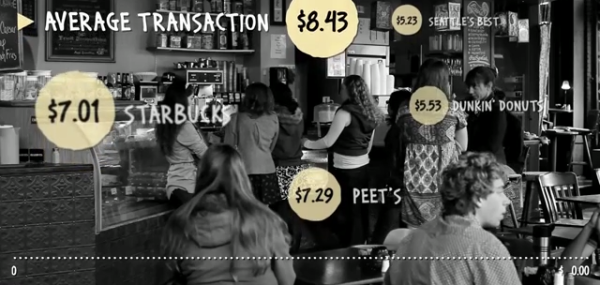
New infographic video from Mint.com,  Eat, Drink and Be Thrify uses their data to visualize the statistics behind monthly spending habits.
So how does your spending on food and dining compare to that of your peers? Using aggregate and anonymized data on Food & Dining spending from Mint.com, we created the video above to highlight some of the most interesting trends we found in Mint’s data, from average transaction at a variety of coffee shops, grocery stores and fast food restaurants, to the time of year when Mint users spend the most — or the least — in those categories.